Your wedding photos,
through every guest’s eyes.
Collect the candid moments from every table in one shared gallery. Guests scan your QR code and upload photos or videos from their browser, without a required app download or account.
Host on iPhone · Guests on iPhone or Android.
7-day host trial, then the selected plan renews unless cancelled. US: $9.99/month or $69.99/year. See pricing and local terms.
Choose your photos
Enjoy the shared feed

How wedding photo sharing works
From your first QR code to the final collection
Create your wedding gallery
Set up the event in Capture on your iPhone. Choose who can upload, comment, or download, and enable Require Approval if you want to review guest photos first.
Invite guests with one QR code
Open the event’s sharing screen and place its QR code on table cards. Guests scan with an iPhone or Android camera and open the gallery in their browser.
Enjoy the photos, then save them
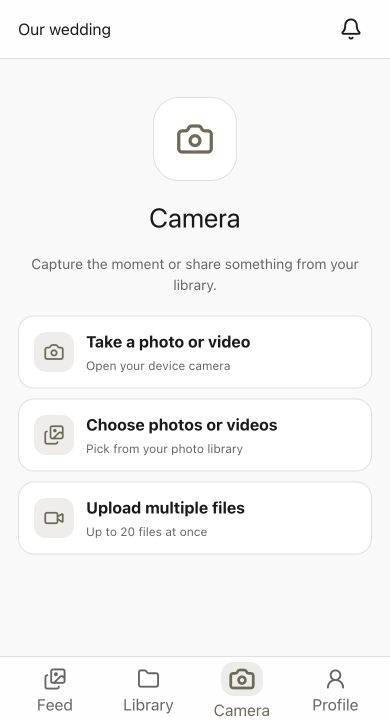
Guests take a new photo or select photos and videos already on their phone. Review the shared feed, then use Export Album in the host app to save the collection.
Guest photos, together
Make room for the moments guests capture
Your photographer creates the story of your wedding. Guest photos add another view: the laughter at each table, the reunions, and the moments happening elsewhere in the room.
Give guests a simple invitation
One scan opens the gallery in a modern mobile browser. Put a short invitation beside the code so guests know where their photos are going.
Keep one place for the collection
Bring contributions together without searching through separate conversations. Keep camera originals separately if you want archival files or large prints.
Make sharing easy to find
Use table cards during the reception and send the same gallery link in your thank-you message. Guests can contribute photos they took earlier, too.
The Experience
A gallery that fits your celebration
Browser uploads for guests
Guests can take browser photos with filters, try Photo Booth, or select existing photos and videos. No required guest app or account; the host manages the event on iPhone.
Unlisted, with host controls
Share the gallery through its QR code or link and review uploads before they appear. Anyone with a forwarded code may be able to join, so keep it within your guest channels.
Share now. Reveal later.
Choose a live gallery or schedule a reveal in the host app. Browser guests can keep uploading while the album counts down. For automatic photo rotation on a venue screen, use the host app’s Slideshow and rehearse the connection.
Save your wedding collection
Use Export Album to get the collection: Create ZIP packs every original photo and video into an emailed download link, and Save to Photos puts everything into an album in the Photos app.
Guest Reactions & Comments
Guests can react to photos and leave comments when you enable them. Turn comments or guest downloads off in the event settings if your celebration needs a quieter gallery.
7-Day Free Trial
The host subscription starts with a 7-day trial. The selected plan renews unless cancelled: US reference pricing is $9.99/month or $69.99/year. Guest uploads are free; local App Store terms apply.
Plan the complete experience
Related guides and answers
Wedding QR sign wording
Copy a table-card prompt, MC announcement, or thank-you message.
Live photo wall setup
Prepare your screen, moderation, and venue rehearsal.
Disposable camera apps compared
Compare Lense, Disposable.app, and Capture for your celebration.
Wedding QR photo album
Plan the printed code, guest uploads, and final collection.
More planning help: Candid wedding photo tips · Wedding photo shot list · Plans and free trial · Wedding photo apps compared
FAQ
Common questions
No. Guests open the QR code or guest link in a modern iPhone or Android browser and can upload without a required app download or account. The host creates and manages the event in Capture on iPhone.
Yes. The host subscription includes a 7-day trial. The selected plan renews unless cancelled; US reference prices are $9.99 monthly or $69.99 yearly. Local App Store pricing and eligibility may differ. Guests do not pay to upload.
Yes. Guests can choose existing photos and videos from their phone library or use the device camera. Browser batch uploads accept up to 20 files at a time.
Yes. Photos and videos are stored exactly as guests upload them, with no resizing or re-compression. Capture also keeps a smaller 2,048-pixel copy for fast browsing; downloads and exports always use the original file. Inspect a sample download before deciding how to print it.
The gallery is unlisted and shared through its event code or link. The code can be forwarded, so distribute it through your intended guest channels. Host controls let you review uploads and manage guests; the QR code itself does not verify an invitation.
Yes. Enable Require Approval in the host app’s event settings to review guest submissions in Pending Uploads before they enter the guest gallery. You can also remove photos and use guest-management controls.
Place it on table cards and a welcome sign, with a short instruction such as “Scan to share your photos. No app needed.” Test the final printed card on two phones and ask the MC for a brief reminder during the reception.
Yes. Open Manage event, then Slideshow, in the host app for automatic photo rotation. Connect the host device to a compatible venue screen and test uploads, approvals, and the display. The browser gallery can show a feed but does not automatically rotate photos.
Send guests a final reminder while uploads remain open, then use Export Album in the host app and save a separate backup. Confirm access and subscription settings before ending your host plan. Ask guests to retain originals if you may need them for prints.

See your wedding
through their eyes.
Create your wedding gallery today and give every guest the power to contribute to your most important collection of memories.
Built for private events and guest participation